Security
How MarcoPolo keeps your data and credentials secure while giving AI the access it needs.
When you give an AI agent access to your databases and CRMs, two questions come up fast: Can it see my credentials? and Can I see what it's doing?
MarcoPolo is built around these questions.
The short version
The AI never sees credentials. Database passwords, API tokens, and connection strings are stored encrypted and injected by a privileged layer the AI can't reach. This is an architectural boundary, not a policy.
Every user is isolated. A dedicated Kubernetes container per user, with its own workspace filesystem. No cross-tenant access.
Data is queried in place. MarcoPolo doesn't replicate or warehouse your data. Queries execute against your systems. The results you pull are cached in your workspace for iteration, but your source data stays where it is.
Everything is visible. Every query, command, and tool call is visible in the conversation and recorded in MarcoPolo's activity log. Every query file, downloaded dataset, and generated artifact is saved to your workspace filesystem, and scheduled jobs are listed in your workspace's crontab. Nothing runs in the dark.
No training on your data. Customer data never enters any AI training pipeline.
Architecture
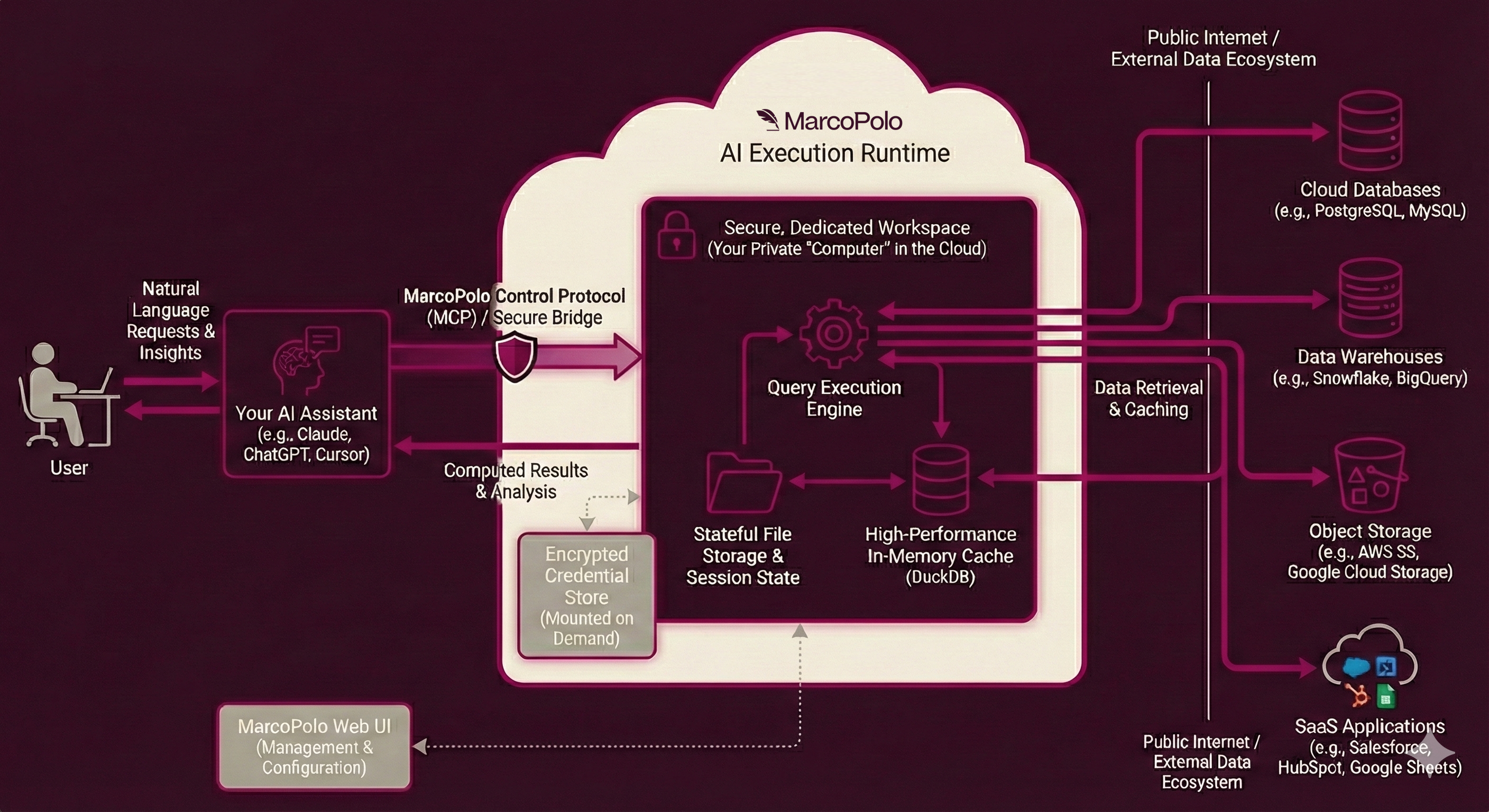
The system has three layers:
AI Assistants (Claude, ChatGPT, Cursor, etc.) connect via MCP to your workspace. They operate in user mode through tools such as workspace_shell, connections_list, data_query, and install_demo_connection — they can write queries and process results, but they cannot access credentials or connection configurations.
Your MarcoPolo Workspace is an isolated container with DuckDB, Python, shell, and persistent filesystem. This is where all data processing happens.
Your data sources (databases, warehouses, storage, SaaS apps) are reached through 50+ connectors. Between the workspace and your data sources sits the privileged execution layer: the component that injects credentials and executes queries. Credentials flow from secure storage to the execution layer, never to the workspace.
Transparency
A common concern with AI agents: "What is it actually doing?"
Everything the AI does is visible and auditable. The AI surfaces the exact SQL, API calls, and commands it runs. You see every operation in the conversation.
Beyond the conversation, your workspace filesystem is a persistent record of all work done:
connections/<name>/queries/contains every query the AI wrote against each connectiondata/downloads/contains files pulled viaconnection downloadscripts/andartifacts/hold reusable programs, analysis outputs, and generated dashboards
Browse these files through the web app or ask your AI to list them. Combined with conversation history, you have a complete audit trail of what happened and when.
Deep dives
- Credential Isolation: How the privilege boundary prevents credential exposure.
- Workspace Isolation: How per-user containers enforce tenant separation.
- Compliance & Audit: Audit trails, data handling policies, and data residency.
Download the security brief (PDF)
For security questions or compliance documentation, contact [email protected].