Context
The artifacts that teach your AI to write correct queries: RULES.md, SYNTAX.md, and saved queries.
MarcoPolo executes queries inside your workspace and returns only summaries to the AI. A 4MB query result becomes a 1KB summary in the conversation. This keeps the context window focused on reasoning, not raw data.
But summaries alone aren't enough. Schemas don't tell your AI that "active users" means users with a session_start event in the last 30 days, or that the revenue column in invoices_eu is in EUR while orders.revenue is in USD. And schema alone won't teach it the right query syntax for Salesforce SOQL vs. PostgreSQL vs. ClickHouse.
The workspace stores three kinds of context that your AI reads before writing any query.
Where context lives
| File | What it is | Owner |
|---|---|---|
/workspace/RULES.md | Your personal rules and conventions, across every connection | You |
/workspace/workflows/*.md | Canonical guides for recurring tasks | MarcoPolo |
connections/<name>/README.md | Connection summary + authoritative capabilities | MarcoPolo |
connections/<name>/RULES.md | Per-connection rules, shared with everyone who can use the connection | Connection owner (and admins) |
connections/<name>/SYNTAX.md | Query syntax reference for this connection | MarcoPolo |
connections/<name>/queries/ | Saved query files | You and your AI |
connections/<name>/metadata/ | Schema snapshots from connection describe | Your AI |
The shape is the same for every connection. Once your AI knows it, switching from Snowflake to Postgres to Salesforce doesn't require relearning where things live.
RULES.md: your business logic
RULES.md files document the knowledge that makes queries correct. Your AI reads them before every query so it arrives with your definitions, conventions, and gotchas already loaded.
A good RULES.md turns your AI from a generic SQL generator into an analyst who understands your data. This is the single highest-leverage thing you can do in MarcoPolo.
Workspace-wide RULES.md
Lives at /workspace/RULES.md. Your personal context that applies across all connections. It stays in your workspace unless you explicitly share the file:
- Descriptions of each connection and what lives where
- Universal metric definitions (DAU, MAU, MRR, churn, LTV)
- Naming conventions and terminology
- Cross-connection relationships and canonical sources of truth
- Anything a new analyst would need on their first day
Per-connection RULES.md
Lives at connections/<name>/RULES.md. Context specific to a single connection, visible to everyone with access to it. The connection's owner and admins edit it in the web app, and the owner can also save it from the workspace with connection edit-context; direct edits to the file in the workspace are overwritten:
- Which tables to use (and which to avoid)
- How metrics are calculated in this system
- Known quirks: NULLs, data gaps, encoding issues
- Join keys between tables
- Query patterns that work well (and ones that are slow)
SYNTAX.md: how to query each system
Each connection ships with a connections/<name>/SYNTAX.md written by MarcoPolo. These are query syntax guides for the specific system the connection points at.
For a Salesforce connection, SYNTAX.md covers SOQL queries, REST API passthrough, and metadata operations. API connectors such as HubSpot, Jira, or Google Drive document the operations and query-file format they accept. SQL databases like PostgreSQL point to the system's standard SQL dialect. Your AI reads the relevant SYNTAX.md before writing a query so it uses the right syntax for the right system.
You don't write these. They're regenerated by the platform.
Metadata snapshots
connection describe <name> --json writes structured snapshots into connections/<name>/metadata/. These are the durable, in-workspace reference for query authoring — stable across sessions, cheaper than re-hitting the live system, and reproducible (the snapshot is what existed at the time of describe, regardless of what changed later upstream).
Your AI re-runs describe only when the snapshot is missing or stale, or when a query fails because the structure no longer matches. Re-running on every query wastes connection resources and pollutes git history.
Saved queries
Existing query files in connections/<name>/queries/ encode patterns that already work in this workspace — connection-specific syntax, naming, filters, and joins. Your AI prefers adapting an existing query file to writing one from scratch.
Over time the queries/ directory becomes a library: the workflow that pulled last quarter's revenue, the diagnostic that flagged the bad partition, the join that finally got the customer match right. They persist, get committed, and stay reusable.
How to edit RULES.md
The platform owns SYNTAX.md and metadata snapshots. RULES.md files are yours to write and maintain: the workspace-wide file belongs to you, and each connection's file belongs to the connection's owner.
In the web app
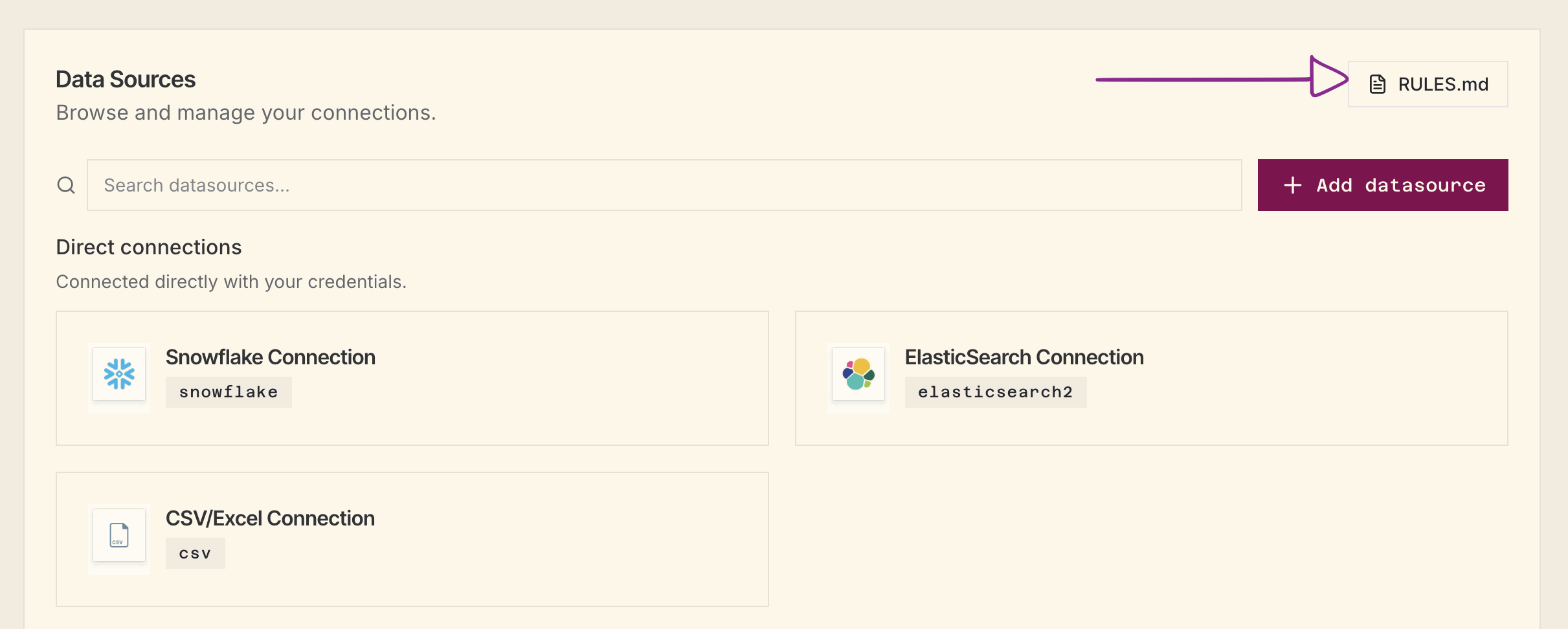
Workspace-wide rules: On the Connections page, click the RULES.md button.
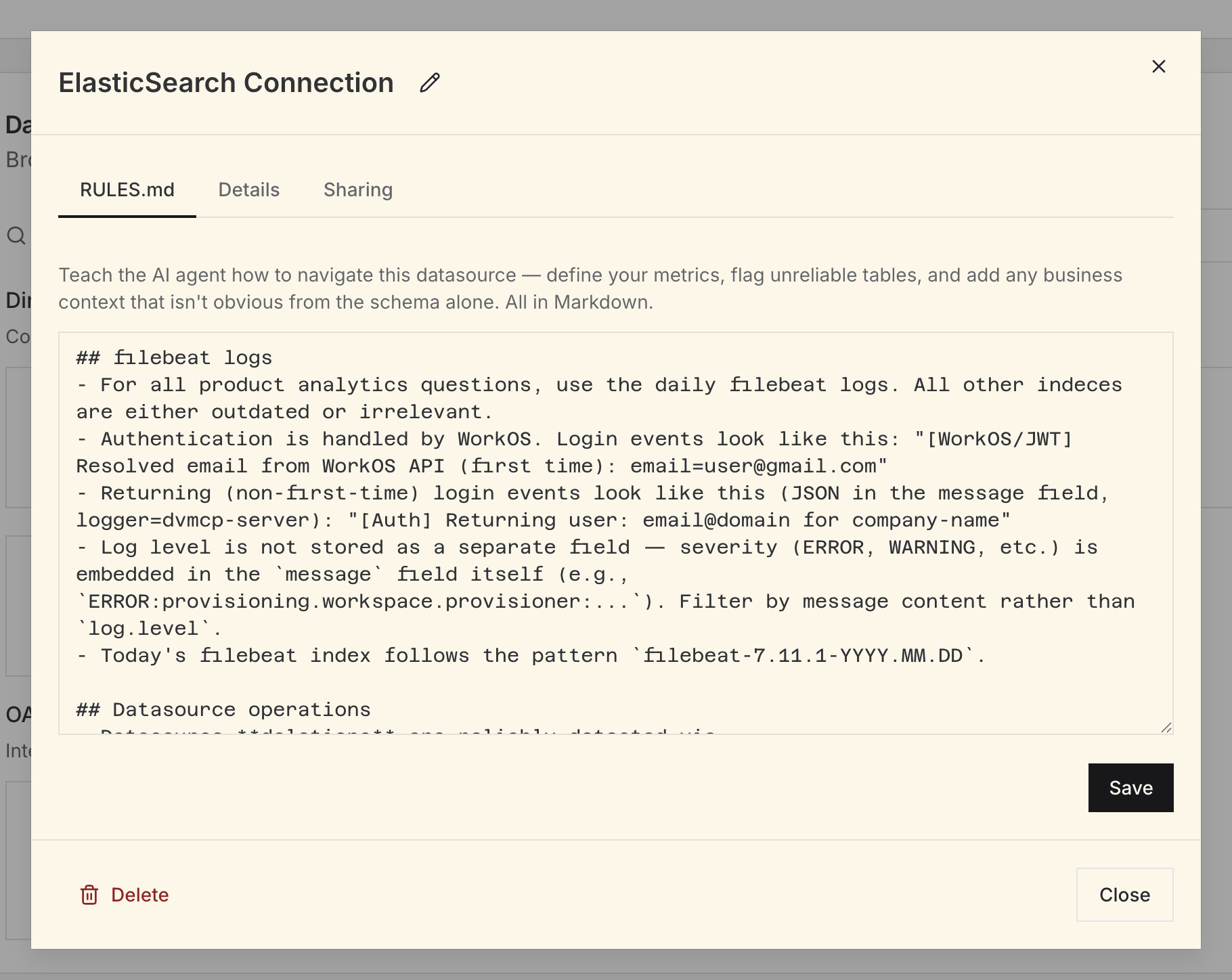
Per-connection rules: Open any connection's detail view and click the RULES.md tab. You can edit it if you can manage the connection; otherwise it's read-only.
Through your AI
Your AI edits /workspace/RULES.md directly. For a connection you own, it saves the updated rules with connection edit-context <name> <source-file> (see Connection CLI). After a session where your AI corrected a mistake or discovered a quirk:
You: "Update RULES.md with anything you learned that would have
      helped you answer more accurately."
You: "Add what you discovered about the join between Salesforce
accounts and our Postgres companies table to the RULES.md."The AI writes only what it can support from the session: corrections it made, schema details it confirmed, or logic it had to work through.
What to write in RULES.md
Start with things that have caused wrong results. Here are the highest-value patterns:
Metric definitions
## Key Metrics
- **MAU**: Users with at least one `session_start` event in the last 30 calendar days.
  Do NOT use `users.last_active_at`. It is not reliably updated.
- **MRR**: Sum of `subscriptions.monthly_amount` where `status = 'active'`
  and `plan_type != 'trial'`. Exclude one-time charges.
Canonical tables
## Where to find things
- User identity: `core.users`. Do not use `legacy.user_profiles`.
- Revenue: `billing.subscriptions` for recurring, `billing.charges` for one-time.
- Events: `analytics.events` (partitioned by `event_date`).
Gotchas
## Known Issues
- `orders.amount` is in cents, not dollars. Divide by 100.
- The `region` column is NULL for all records before 2022-01-01.
- `users_v2` and `users` are separate tables with different data.
  Always use `users_v2` for anything after the 2023 migration.
Cross-connection joins
## Joining Across Connections
- Salesforce → Postgres: `salesforce.accounts.external_id = postgres.companies.crm_id`
- HubSpot → Postgres: `hubspot.contacts.email = postgres.users.email`
Why this matters
Every data tool requires human judgment to use correctly. A SQL client doesn't stop you from querying a deprecated table. A BI tool doesn't know that two columns with the same name mean different things.
These context artifacts transfer that judgment to your AI. RULES.md encodes your business logic. SYNTAX.md teaches the right query language. Saved queries and metadata snapshots show proven patterns. Together, they turn a generic AI into one that understands your data.
The 15 minutes you spend writing RULES.md will save hours of corrections.